Showing posts with label facebook tips. Show all posts

Facebook Application Or Spam?

Recently I have been seeing and getting tons of notification of "Find Who Will Be Your Valentine In 2014 @ xyz.com" on Facebook. Its look something like this:

Find Who Will Be Your Valentine In 2014 @ ==>

Well this is nothing more than a shitty spam and it will post on group you joined, your wall and friend's wall without your acknowledgement. These types of application may lead to account compromise. So better have an eye on what you giving permissions to these 3rd party application. 

How to prevent From these types of application?

  •  First of all, always have an eye on what permission you giving to that particular application and only give it if you trust that application. Some trusted Facebook applications are Twitter, Intel and many more. 

Note: Application having name like "Microsoft" doesn't always means that the application belongs to Microsoft. Like this one 
Find Who Will Be Your Valentine In 2014 @ xyz.com


  • Always click on "Skip" button, when it asks for "Post on you behalf" until and unless its a trusted Facebook application.

So what I do now? I already given permission!

Don't panic, just go under account section and then App Tab from there remove that application. 

Feel Free To Leave A Comment If Our Article has Helped You, Support Us By Making A Small Contribution, Thank You!
Read more

LikeJacking Facebook Fan Page


Hello Friends, This is about Likejacking, how to Get More Likes For Your Facebook Fan Page.

LikeJacking Is Not Virus/Trojan, Neither Does It Download Any AutoBots To Get "LIKES", Its a Javascript and CSS Trick, Which Takes LIKES From Visitor, when He/She Visits A Web-Page Without Their Knowledge.

So Here Is What You need To Do.

Every WebPage Has Basically the Below Backbone Structure

<html>
    <head>
        <!-- Download The Header Script And Paste In This Section -->
    </head>
   
    <body>
        <!--Its Upto You, What You Put On the Body Of the WebPage -->
       
        <!-- Download The Footer Script, Paste It Here Below The Body Contents -->
    </body>
</html>

Note: <!-- --> This is a comment Tag, Anything inside this will be ignored by Browser, Make Sure, you are not Pasting the Script inside these Tags

Download Links

Header Script : Click Here
Footer Script : Click Here
Demo WebPage : Click Here

Note: From the Footer Script inside <iframe> tags, replace "http://www.facebook.com/ssutradhar35" with your own FB Fan Page Link.

If You Check The Demo Page, Nothing Really happens when Visitor would try clicking, Its Just An Illusion, But that would fetch A Like For Your Page From the Visitor, without his/her knowledge.

Now, If You Really Want To Use This, You Need To Open An Account With Free Or Paid Web-Hosting, And Host This Page, And Share The Link Among Friends. And If You Are A Web Defacer, You Can Well Use Them With Your Defacement And Then See The Magic.

Hope This Was Interesting.


Feel Free To Leave A Comment
If Our Article has Helped You, Support Us By Making A Small Contribution, Thank You!
Read more

A Guide to Facebook Security

Facebook Security Guide


Facebook has (finally) released a simple to understand user security guide (pdf) to help members avoid some of the many pitfalls of using the social networking giant.

The guide was written by Symantec's former Senior Director of Internet Safety Linda McCarthy and Purdue University instructor Keith Watson, and was edited by Denise Weldon-Siviy.

The guide instructs account holders on how to:
  • Protect your Facebook account
  • Avoid the scammers
  • Use advanced security settings
  • Recover a hacked Facebook account
  • Stop imposters

The guide offers some fairly good advice and illustrative graphics on how to spot common scams and other mischief that has plagued the social network for some time.
It is written in simple enough terms that you, your kids, and your grandparents can all increase your Facebook security outlook a great deal in a matter of only a few minutes.

Click Here To Download The PDF

Dont Forget To Hit LIKE and Share For The Post, If the Information Was Not Known To You Before.

Feel Free To Leave A Comment

If Our Article has Helped You, Support Us By Making A Small Contribution, Thank You!

Read more

How To Make a Phishing Page

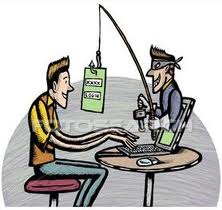
In this Article I will share how to make any Phishing Page. Phishing is a fraudulent attempt, usually made through email, to steal your personal information. Phishing is a way of attempting to acquire information such as usernames, passwords, and credit card details by masquerading as a trustworthy entity in an electronic communication. Communications purporting to be from popular social web sites, auction sites, online payment processors or IT administrators are commonly used to lure the unsuspecting public. Phishing is typically carried out by e-mail spoofing or instant messaging, and it often directs users to enter details at a fake website whose look and feel are almost identical to the legitimate one.

Let us try to make a phishing page for Facebook

Since we are creating for Facebook, we need to go to Facebook Login Page(In case you try for other sites like orkut, myspace, gmail, etc etc. you need to go to respective page)

Step1:
So lets go to facebook login page by clicking here: http://www.facebook.com/login.php

Step2:
Right Click anywhere on the Page, and click on View Source; a windows would pop-up, click on File>>Save as>>phisher.html(Save the file to Desktop)

Step3 :
Open the html file with notepad.


Step4 :
Hit Ctrl+F and then search for form method="POST" and replace it with form method="GET"

Step5 :
And next is replacing action="https://login.facebook.com/login.php?login_attempt=1" with action="test.php"

Step6 :
Now we need to make a php file, open a notepad and type following as it is.

NOW save this as test.php

Now Create an Account With: http://www.my3gb.com/

Then Go to My Files and Upload The “phisher.html” and “test.php” Check the Link For your “phisher.html”

Copy the link in a notepad.

Facebook will not allow you to post links from my3gb.com sites, now we need to hide the URL so that we can post it in Facebook.

Now go to,  Click Here to Register(www.dot.tk)

Enter any attractive name, so that the Link name can fool people, ex: 3Dfacebookapp.tk, click on GO, next page enter the Link for your phishing page, Registration Length period as You wish and click on continue without signup.

And once you are done, the link for your Phishing page is “3Dfacebookapp.tk “

Now You can post This Link to Facebook to Trap Your Friends.

Anyone Clicking on Your Link Would get Facebook Login Page, now when he enters the Facebook ID and Password, It will redirect him to Facebook Page, but will leave a copy of the Facebook Id and Password on you’re my 3gb.com account, under hacked.txt file, you can open up your account, and check the hacked.txt file to get the victims email address and password.

So, This Should Give You an Idea how to create a Phishing Page!

NOTE: This is just for Educational Purpose, For Any Damage or Misuse, I Shall Not Be Held Responsible for any consequences.

Hit LIKE on the Left Hand Side if  This helped you to Learn.

If You Have Any Problem Creating Facebook Phishing Page, you can click here to Download it:

Click Here To Download Phisher HTML


Click Here To Download test.php File

Leave a Comment For Any Doubts.....
Feel Free To Leave A Comment

If Our Article has Helped You, Support Us By Making A Small Contribution, Thank You!


Read more